

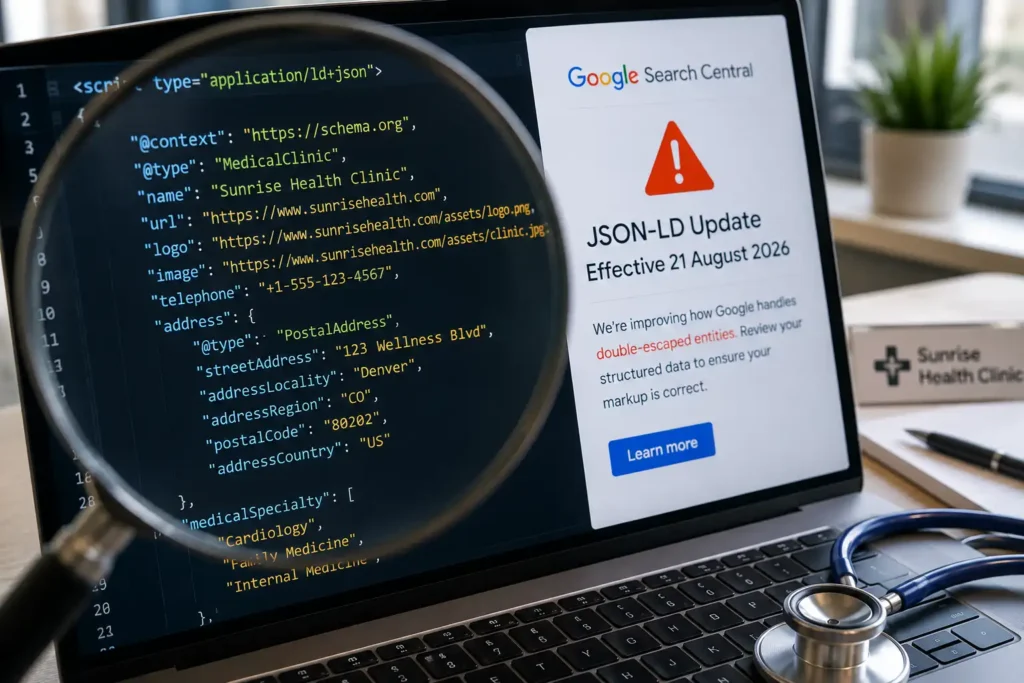
On August 21, 2026, Google Search Central posted an announcement that made SEO professionals sit up, and confused almost everyone else. It was about something called “JSON-LD” and a change to how Google’s parser handles “double-escaped entities.”
If that sentence meant nothing to you, you are exactly who this article is for.
This Google JSON-LD structured data update is not a Google algorithm penalty, and it is not a ranking downgrade. But it directly affects whether the “medical facts” your website hands to Google, your doctor’s name, your clinic’s address, your FAQ answers, your reviews, are read correctly. And for a healthcare practice, that matters more than it would for almost any other kind of business. Patients don’t just skim a clinic’s website; they check it for accuracy the same way they’d check a diploma on the wall. If you care about showing up cleanly in Google AI Overviews, ChatGPT, or Perplexity, this is a technical detail worth five minutes of your time.
We’re going to explain this the way we’d explain it to a client over coffee: no code, no jargon, just plain analogies. By the end, you’ll know exactly what changed, why it’s really a healthcare SEO issue and not just a Google issue, whether your clinic’s website is affected, and what to tell your web developer.
What Actually Happened on August 21, 2026 (And Why Healthcare SEO Teams Are Paying Attention)
Look at Google’s exact wording from its official announcement:
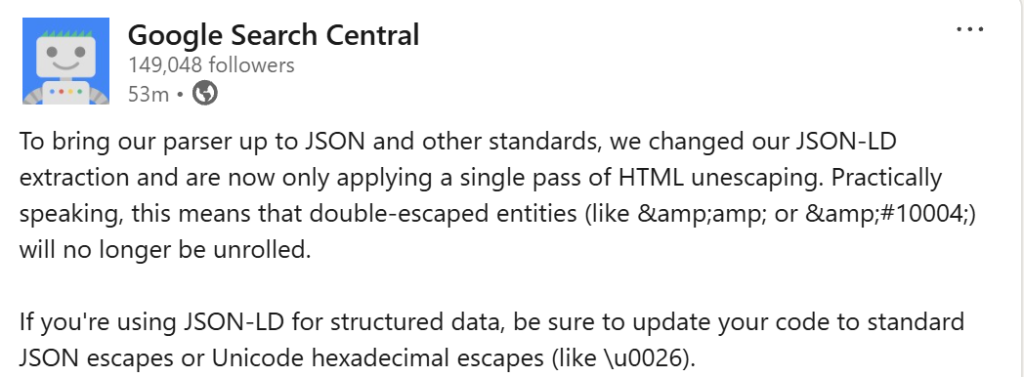
“To bring our parser up to JSON and other standards, we changed our JSON-LD extraction and are now only applying a single pass of HTML unescaping. Practically speaking, this means that double-escaped entities (like
&or✔) will no longer be unrolled. If you’re using JSON-LD for structured data, be sure to update your code to standard JSON escapes or Unicode hexadecimal escapes (like&).”Google Search Central, official announcement, August 21, 2026
Translated into plain English: Google changed how carefully it “cleans up” the hidden code on your website that describes your clinic, your doctors, and your services to search engines and AI assistants. It used to clean that code twice if needed. Now it only cleans it once.
That’s the whole announcement. But the ripple effects for medical websites are worth understanding, because a lot of clinic websites, often without anyone realizing it, have exactly the kind of messy code this update targets.
Why This Technical Update Is Really a Healthcare SEO Story
Most SEO news gets treated as “developer stuff” and ignored by the business owner. That’s usually fine. This one is different, and here’s the healthcare-specific reason why: the fields most likely to contain the ampersands, apostrophes, and special characters that trigger this bug are exactly the fields patients trust most on a medical website: doctor names, credentials, insurance lists, and FAQ answers about treatment. A garbled coupon code on a retail site is a shrug. A garbled doctor’s name or insurance answer on a clinic site reads as sloppy, and in a YMYL (Your Money or Your Life) category like healthcare, Google and AI systems already apply extra scrutiny to accuracy and trustworthiness.
| Factor | Typical Business Website | Healthcare / Clinic Website |
|---|---|---|
| What breaks if JSON-LD is double-escaped | A product name or promo text | A doctor’s name, credential, or insurance answer |
| Patient/customer trust impact | Minor annoyance | Directly undermines perceived medical credibility |
| Google’s scrutiny level (YMYL) | Standard | Elevated, healthcare is a “Your Money or Your Life” topic |
| Risk if AI assistants misread the data | A missed sale | A misinformed patient, or a lost referral to a competitor |
That’s the blend worth remembering: this isn’t just a “Google changed something” story. It’s a healthcare SEO story about why accuracy in the code behind your website carries more weight for doctors than it does for almost any other type of business.
Why Your Clinic’s Website Even Has This “JSON-LD” Thing in the First Place
Before we explain the change, you need thirty seconds of background on what JSON-LD actually is. No coding required.
Think of JSON-LD as Your Clinic’s ID Card for Google
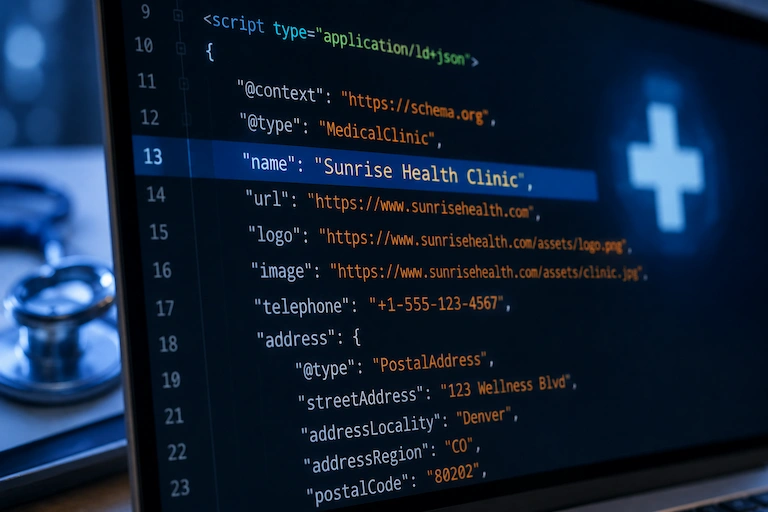
Every time a patient meets a new doctor, they don’t just judge the doctor by appearance. They check credentials: a medical license, board certifications, hospital affiliations. That paperwork tells a stranger, quickly and reliably, “this person is who they claim to be, and here are the facts about them.”
JSON-LD does the same job for your website. It’s a small block of hidden code that tells Google (and increasingly, AI systems like ChatGPT and Gemini) facts such as:
- Your clinic’s official name, address, and phone number
- Your doctors’ names, specialties, and qualifications
- Your operating hours and accepted insurance
- Your patient reviews and star ratings
- The exact questions and answers on your FAQ page
You will never see this code as a visitor. It’s invisible to patients browsing your site. But search engines and AI models read it constantly, and it’s one of the clearest signals they use to understand, and trust, what your clinic actually offers. We cover this in more depth in our LLM SEO glossary if you want the fuller picture of how AI systems read website data.
Where This “ID Card” Lives on Your Website
This code sits inside your webpage’s underlying HTML, wrapped in a script tag that browsers ignore but search engines actively scan. Most clinic websites generate it automatically through a plugin, a website builder, or a developer’s custom code. That automation is exactly where today’s problem tends to creep in.
The Simple Analogy That Explains “Double-Escaping” to Anyone
This is the part that trips people up, so let’s slow down and use a real-world comparison.
The Photocopy-of-a-Photocopy Analogy
Imagine you write a note by hand: “Dr. Smith & Associates.”
Because typewriters and old computer systems couldn’t always handle certain symbols like the ampersand (&), there’s a long-standing convention on the web of “encoding” special characters into safer text codes. The ampersand becomes &. It’s like folding your note into an envelope so it survives the mail system.
Now imagine someone accidentally folds that already-folded envelope into a second envelope. When the ampersand gets encoded twice, instead of one &, you end up with &: an envelope inside an envelope.
A Real Example With Your Clinic’s Name
Here’s how this plays out in practice on a medical website:
| What you typed | What should appear | What happens if double-encoded |
|---|---|---|
| Dr. A & B Clinic | Dr. A & B Clinic | Dr. A & B Clinic |
Old Parser Behavior vs. New Parser Behavior
| Aspect | Before August 2026 | After August 2026 |
|---|---|---|
| Envelope inside an envelope (double-escaped code) | Google kept unfolding until it found the original text | Google unfolds once and stops |
| Who “fixes” sloppy code | Google, silently, on your behalf | Your website’s code, or nobody |
| Risk to display accuracy | Low, mistakes were usually auto-corrected | Higher, mistakes now show up as-is |
| Standards compliance | More forgiving than the official JSON standard | Matches the official JSON standard |
In short: as of this update, Google’s parser opens the outer envelope once and stops. If there’s a second envelope inside, it no longer bothers unfolding it. The result: instead of showing “Dr. A & B Clinic,” Google’s system may now read and display the messier “Dr. A & B Clinic,” a visibly broken, unprofessional-looking string of code showing up where a clean business name should be.
Sarthak Jain’s Take: What I’ve Seen Break on Real Clinic Websites
A few years back, we onboarded a multi-doctor orthopedic clinic whose legal name included an ampersand: something like “Kapoor & Associates Orthopedic Center.” Their previous developer had built the FAQ schema by copy-pasting answers straight out of a Word document. Word quietly encodes special characters when you paste it into certain web tools, and the developer’s own plugin then encoded that text a second time when it generated the JSON-LD. Nobody noticed, because for years Google was quietly unfolding that double-encoded mess and displaying the clinic’s name correctly anyway.
The only reason we caught it was a routine structured data audit, months before this update even existed. Under the old, forgiving parser, it was a cosmetic non-issue. Under the new, stricter parser, that same clinic would now be showing “Kapoor & Associates” in its structured data preview, exactly the kind of detail that quietly chips away at how trustworthy a medical brand looks in search.
“In healthcare SEO, the small technical details are never really small. A patient deciding between two orthopedic clinics isn’t reading your code, but Google and AI assistants are, and they’re increasingly using exactly this kind of signal to decide who to trust and who to recommend.”Sarthak Jain, Founder, RankVed
That’s the pattern I’d want every doctor and clinic owner reading this to take away: this update didn’t create a new risk. It just removed Google’s safety net for a risk that’s been quietly sitting on healthcare websites for years.
Why Google Made This Change (It Isn’t Random)
1. Aligning With International JSON Standards
JSON-LD is built on top of JSON, a data format used across virtually the entire internet, not just by Google, but by nearly every app, API, and system you interact with daily. The official JSON standard has one specific, well-defined way of escaping special characters. Google’s old parser was more “forgiving” than the standard technically allows, silently fixing errors that, strictly speaking, shouldn’t have needed fixing in the first place. Google’s own structured data guidelines have long recommended JSON-LD as the preferred format precisely because it’s meant to be clean, machine-readable, and standards-compliant.
2. What This Means for the Long-Term Reliability of Search Results
By tightening the parser to match the actual JSON standard, Google reduces ambiguity. Fewer silent auto-corrections means more predictable, consistent behavior across the billions of pages it crawls, which matters enormously as more of that crawled data gets fed directly into AI systems that generate answers, not just search result links.
Does This Affect Your Clinic’s Website? Here’s How to Find Out
You do not need to know how to code to check this. Here is the non-coder method.
A Step-by-Step Way to Check, With No Technical Background Required
Step 1: Open Google’s Rich Results Test
Go to Google’s Rich Results Test tool. This is a free, official Google tool, and no login is required.
Step 2: Paste Your Clinic’s Page URL
Paste in your homepage, your doctor bio pages, and your FAQ page one at a time. Click “Test URL.”
Step 3: What “Healthy” Looks Like
You’ll see a green checkmark and a preview of the structured data Google extracted. Your clinic name, doctor names, and FAQ text should look clean and readable, exactly as they appear on your actual page.
Example of a Clean Result
The preview shows “Family Care & Wellness Clinic” exactly as it reads on your homepage: no stray symbols, no odd character codes, nothing that looks out of place.
Step 4: What a Problem Looks Like
If you see strange text like & or garbled character codes inside fields that should be plain words (like your clinic’s name or an FAQ answer), that’s the double-escaping issue this update surfaces.
Example of a Broken Result
The preview shows “Family Care & Wellness Clinic” instead: the same name, but now carrying a visible code fragment that a patient (or an AI assistant summarizing your practice) would read as a typo or an error.
How This Would Look on a Real Doctor Bio Page
If your FAQ schema includes an answer like “We accept Medicare & most major insurance plans,” a double-escaping error would surface it as “We accept Medicare & most major insurance plans” inside Google’s structured data preview: a small detail, but exactly the kind of thing that undermines the polished, trustworthy impression you want your practice to make in search results.
Common Places Where Double-Escaping Sneaks Into Medical Websites
1. Doctor Names or Clinic Names With Special Characters
Anything with an ampersand, apostrophe, or accent mark, such as “Dr. O’Brien,” “Smith & Associates Family Medicine,” or “Children’s Wellness Clinic,” is at higher risk.
2. FAQ Schema Copied From Word Documents
Content pasted from Microsoft Word or Google Docs often carries invisible formatting that gets encoded, then re-encoded when it’s pushed into your website’s FAQ schema. This is exactly what happened with the orthopedic clinic in the story above.
3. Website Builders and Plugins That Auto-Encode Text
Some WordPress SEO plugins, healthcare website templates, and third-party review widgets encode text automatically. If your theme or another plugin already did that once, you get the “double envelope” problem without a single line of code ever being touched by a human.
What Happens If You Do Nothing
| Scenario | What You’ll See | Impact on Healthcare SEO and AI Search Visibility |
|---|---|---|
| Best case | Your JSON-LD is already clean, no special characters in key names or answers | Zero visible effect from this update |
| Worst case | Broken text like “&” showing where a clean name or answer should be | Lower patient trust, weaker citations in AI Overviews and AI assistants |
To be clear, this isn’t a ranking penalty in the traditional sense. But it is a trust and accuracy problem: broken-looking text next to your practice’s name does not inspire confidence in a patient scanning search results, and inaccurate extraction means AI assistants may summarize your practice incorrectly, or skip citing you altogether in favor of a competitor whose data reads cleanly.
The Fix, Even If You’ve Never Touched Code
1. Talk to Whoever Manages Your Website
This is a developer-level fix, but it takes most developers minutes once they know what to look for.
2. What to Literally Tell Your Developer or Agency
Send them this exact message: “Can you check our JSON-LD structured data for double-encoded HTML entities, things like & instead of &, and make sure we’re using standard JSON escaping instead? Google changed its parser in August 2026 and stopped auto-correcting this.”
3. If You Use WordPress, Wix, or a Healthcare Website Builder
Ask your platform’s support team or your SEO agency to run your key pages through the Rich Results Test after any fix, to confirm the output is clean. If you’re not sure where to start, this is exactly the kind of technical health check we build into ongoing healthcare SEO services. Clinics that get this cleaned up once rarely have to think about it again.
Why This Small Technical Update Matters More Than It Looks for AI Search Visibility
1. How ChatGPT, Gemini, and Perplexity Also Depend on Clean Structured Data
AI search tools don’t read your website like a human does. They rely heavily on structured signals, including JSON-LD, schema markup, and clean HTML, to quickly and confidently extract facts they can cite. When that data is malformed, even slightly, AI systems are more likely to skip a source entirely rather than risk citing inaccurate information. Our guide to AI search optimization for doctors goes deeper into exactly which signals these systems weigh most heavily.
2. Clinics That Get This Right Become the Sources AI Assistants Trust
Clinics that structure their content this way, clean, standards-compliant, verifiable, often become sources AI answers actually pull from. This update is a small reminder of a bigger pattern: the healthcare websites that treat structured data as a first-class part of their SEO strategy, not an afterthought, are the ones that keep showing up as search evolves.
What the Data Says About Why Structured Data Accuracy Matters Right Now
This isn’t a theoretical concern. The shift toward AI-mediated healthcare search is happening fast, and the numbers back it up:
- Google’s AI Overview presence in healthcare-related searches grew from 59% in December 2023 to 89% in December 2025, with clinical queries (symptoms, treatments, procedures) now seeing 93 to 100% AI Overview coverage, according to BrightEdge’s research on healthcare and AI Overviews.
- 32% of U.S. adults have now used an AI chatbot for health information, double the rate from the year before, and 81% of them took a real-world action afterward, including 40% who went on to consult a healthcare provider, per eMarketer’s analysis of Rock Health survey data.
In other words, more patients than ever are letting AI systems summarize and recommend healthcare providers before they ever land on your website. If the structured data behind your clinic’s name is even slightly broken, you are quietly opting yourself out of that growing channel.
A Simple Structured Data Health Checklist for Clinic Websites
Use this numbered framework as a quarterly check for your practice’s website:
- Test every core page (homepage, doctor bios, FAQ, contact page) through Google’s Rich Results Test.
- Look specifically for double-encoded characters, anything like
&, garbled apostrophes, or duplicated symbol codes. - Check any page with special characters in names first, since ampersands, apostrophes, and accented letters carry the highest risk.
- Re-test after any plugin, theme, or website builder update, since these tools frequently regenerate your JSON-LD automatically.
- Confirm your developer is using standard JSON escaping (or Unicode hex escapes like
&) rather than relying on Google to auto-correct mistakes. - Document the fix so future site updates don’t reintroduce the same encoding error.
For a deeper walkthrough of formatting content so AI systems extract it correctly the first time, see our guide on how to format pages to maximize LLM citations.
Frequently Asked Questions About Google’s JSON-LD Update
1. Is this a Google penalty for my clinic’s website?
No. This is a parsing change, not a manual action or algorithmic penalty. It changes how Google reads your code, not how it judges your website’s quality.
2. Will my Google rankings drop because of this?
Not directly. The main risk is inaccurate or broken-looking data being extracted and displayed, for example in rich results or AI Overviews, which can indirectly hurt click-through rates and trust, even without a ranking change.
3. How do I know if my website is affected without hiring a developer?
Run your key pages through Google’s free Rich Results Test and look for any strange character codes in the preview. If everything reads as normal, clean text, you’re likely fine.
4. What is JSON-LD in the simplest possible terms?
It’s a hidden block of code on your website that tells search engines and AI tools clear facts about your clinic, like an ID card that machines can read instantly instead of guessing from your page’s design.
5. Does this affect my Google Business Profile too?
No. This specific change is about JSON-LD structured data embedded in your website’s code, not your Google Business Profile listing, which is managed separately.
6. My website was built years ago and I’ve never touched the code. Am I at risk?
Possibly, especially if your clinic or doctors’ names include ampersands, apostrophes, or accented characters, or if your site was built with an older plugin or theme. It’s worth a quick check either way.
7. Can I fix this myself without a developer?
If you manage your own WordPress site with an SEO plugin, you may be able to re-save the affected fields (like your business name or FAQ answers) and let the plugin regenerate the code. For custom-built sites, you’ll need a developer to adjust how the code is generated.
8. Does this update affect ChatGPT, Gemini, or Perplexity directly?
Not directly, since this specific announcement is about Google’s own parser. But since clean structured data is a shared best practice across all major AI systems, fixing double-escaped code tends to improve how every AI tool reads your site, not just Google’s.
9. How often should I check my structured data going forward?
A quarterly check is a reasonable baseline for most clinics, with an additional check after any major website redesign, plugin update, or platform migration.
10. Where can I learn more about structured data for healthcare SEO?
Our complete healthcare SEO guide covers structured data alongside the other technical and content factors that influence how doctors and clinics show up in both traditional and AI-powered search.
The Bottom Line for Doctors and Clinic Owners
You don’t need to become a developer to understand this Google JSON-LD structured data update. You just need to know three things: Google is being stricter about how it reads the hidden code behind your clinic’s name, doctors, and FAQs; a quick, free test tells you in under a minute whether you’re affected; and the fix, when needed, takes a competent developer very little time.
What matters more is the pattern behind this update, and it’s a healthcare SEO pattern first, a Google story second. As AI Overviews, ChatGPT, and other AI search tools lean harder on structured data to decide which healthcare providers to recommend, small technical details like this stop being “just for developers” and start being part of how patients find you. Clinics that structure their content this way often become sources AI answers actually pull from. Clinics that stay on top of these details, even the unglamorous ones, are the ones quietly building the kind of AI search visibility that’s much harder for competitors to catch up on later.